Color Your World

Roxanne Lowe's Birthplace Pedigree

Roxanne Lowe’s Birthplace Pedigree

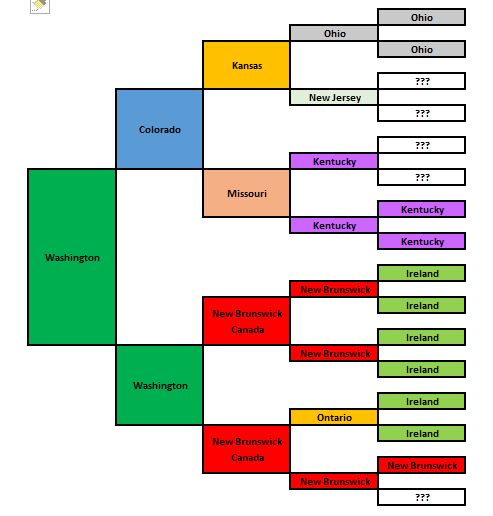
In case you’re more of a “visual” person than a paper person,  try your hand at color coding your five-generation ancestor birth charts using the Excel spreadsheet created by Spokane’s own Miriam Robbins. Her blog post and downloading instructions are available here.

Inspired by J. Paul Hawthorne of GeneaSpy, Miriam’s take on the visual representation of her ancestors’ birth places is making the circuit on Facebook and other social media sites. It’s easy — join the fun!

Seattle Genealogical Society Tip of the Week

Seattle


Tip of the Week – 25 New FamilySearch Collections  

As reported by Dick Eastman in his blog yesterday, there are 25 new collections available at FamilySearch.  These collections encompass about 3 million digital records and about 2 million indexed records.  A few of the larger collections are “Denmark Deeds and Mortgages 1572-1928”, “Indiana Marriages 1811-2007”, “Maryland Church Records 1668-1995”,  and “United States Freedmen’s Bureau Marriages 1861-1872”.

If you’re not familiar with or registered with FamilySearch.org , remember it’s totally free and hassle free, too.  You won’t be bombarded with spam emails after registering nor will you be bombarded with ads as you’re using the site.

For a complete list of the 25 new collections available, follow the link below to Dick Eastman’s blog.  From there you can also click on the blue ink to link to the collection without registering.

http://blog.eogn.com/2016/03/15/new-familysearch-collections-update-march-14-2016/

Seattle Genealogical Society Tip of the Week

Seattle


TIP OF THE WEEK – FAMILY TREE MAKER NOT GETTING AXED

FTM users are breathing a collective sigh of relief. Due to the outrage of Ancestry.com clients and Family Tree Maker users, Ancestry entered into an agreement where Software MacKiev will purchase FTM and  users will receive software updates and new versions from MacKiev.  With a reprieve for Family Tree Maker, a promise of future features and benefits, plus Ancestry says there are plans to connect Ancestry with the RootMagic software by the end of 2016, things are looking up.

Read more of what Ancestry has to say and more about the agreements via Dick Eastman’s blog.  You’ll also find links to Software MacKiev and RootsMagic from his page.

http://blog.eogn.com/2016/02/02/family-tree-maker-to-be-continued-and-with-more-options-than-ever-before/

Seattle Genealogical Society Tip of the Week

Seattle


TIP of the WEEK –  CHRONICLING AMERICA

Launched by the Library of Congress and the National Endowment for the Humanities (NEH) in 2007, Chronicling America provides enhanced and permanent access to historically significant newspapers published in the United States between 1836 and 1922. It is part of the National Digital Newspaper Program (NDNP), a joint effort between the two agencies and partners in 40 states and territories.

Chronicling America is worth frequent visits as more newspapers are added to the project. Newspapers have traditionally been underused as a genealogical resource because it if often difficult to access them. Chronicling America has changed that.

If you’ve never used the site or haven’t been there recently, be sure to check it out.  They posted their 10 millionth page in October 2015! As of today, there’s 10,366,488 pages. These are lesser known newspapers; the ones you will not find digitized somewhere else.  Imagine the thrill of finding your 3xgreat-grandmother’s death notice in the Dakota Territory and learning she left behind 63 grandchildren and 26 great-grandchildren.

There’s a basic search at “Search Pages”, or to narrow your results try the “Advanced Search”, and finally under “All Digitized Newspapers 1836-1922” there is a search by State or Ethnicity or Language, where you are provided a drop-down menu.  Cool.

Thirty-two newspapers in French are digitized, not surprisingly mostly from Louisiana.  Under Ethnicity for African American, there are 50 newspaper titles, spread out from Washington, DC’s  “The Washington Bee” (1886-1912) to Seattle, Washington’s  “Cayton’s Weekly”  (1917-1921).  For the state of Ohio,  there are 129 titles ranging from “Anti-Slavery Bugle” (1845-1861, New-Lisbon, OH) to “The Western Reserve Chronicle” (1855-1873, Warren, OH) and “The Xenia Sentinel” (1863-1865, in where else, Xenia, OH).

Enjoy; this is a site for genealogists and history buffs alike ; here’s the url:   http://chroniclingamerica.loc.gov/search/titles/
Seattle Genealogical Society Tip of the Week

Seattle


TIP OF THE WEEK – ABOUT RETIRING FTM

Many people are upset with Ancestry.com “retiring” the desktop application “Family Tree Maker” aka FTM. The thing to remember is don’t panic.  There is time to explore your options as  Ancestry.com has pledged to support the program through January 1, 2017 and you can actually continue to use it after that for as long as your computer’s operating system will allow. Just be aware that after January 1, 2017 it won’t sync your online tree or do other things that interface directly with Ancestry.com.

Since this is a widely used application we will be visiting the issue again and again. SGS members have made suggestions and pointed to articles they found helpful.

For starters read Keith’s article  at GenealogyTools.com .  It was recommended by Dick Eastman and provides a good overview to the novice of what a “gedcom” file is and how to scrub your data to become “gedcom” compliant.

Find the article here :

Family Tree Software Alternatives, Part 1: How to Scrub Your Data (Updated 16 May 2018)

Seattle Genealogical Society Tip of the Week

Seattle


Tip of the Week – Improve Your Google Search Results

As promised in the last edition here are some examples on using “*” as well as the “site:” operator.

The “*” is known as a wild card in searching. Use “*” to match one or more words in a phrase (enclosed in quotes).  For example,  “Google * my life”  tells Google to find pages containing a phrase that starts with “Google” followed by one or more words, followed by “my life”.  Phrases that fit the bill include : “Google changed by life”, “Google is my life” and “Google helps me with my life”.  Can you see yourself using this when you’re not sure of the exact title of a book, or the entire adage you are trying to recall, or someone’s full name?

The operator called “site:” is used to when you only want results from certain sites or domains.  Likewise with the  “–site:”,  you can exclude a particular site or domain.  Some examples,    “James Brown” site:ancestry.com  or  “James Brown” site:familysearch.org   tells Google  find me all the James Brown pages in Ancestry.com or all the James Brown pages in Familysearch.org, respectively.  Likewise, “James Brown” –site:Youtube.com  says find me all pages for James Brown, but ignore any at Youtube.com

Don’t worry about memorizing the syntax for every operator or punctuation we’ve discussed because you can also use the Advanced Search page to create these searches.   If you search often, try adding advanced search to your favorites:   https://www.google.com/advanced_search

Happy Year End & Happy New Year

How many times have we said, “Oh, what I’d give for one diary entry….one letter…one card…one page….written by my great-great grandmother!!”

I have a great-grandchild due in June 2016. It’s not likely that in 2036 (when he/she is 20) that I’ll be up to telling stories about my life. 

Permission to speak boldly? NEITHER WILL YOU.

But today I can write those stories about my life and by so doing will be leaving a real legacy for her/him. 

Permission to speak boldly? PERHAPS YOU DON’T CARE WHETHER YOUR GREAT-GREAT GRANDCHILDREN KNOW WHO YOU WERE?? It’s your decision. 

Perhaps your New Year’s Resolution or New Year’s Goal might-oughta-should be to start writing the history of you…..for them?

Here’s a great list of ideas to get you started…thinking back across the year 2015:

1.  What did you do this year that you had never done before?
2.  What was the smartest decision you made this year?
3.  What was the biggest risk you took?
4.  What new things did you discover about yourself?
5.  What are you most grateful for this past year?
6.  What was your biggest achievement of the year?
7.  What do you wish you had done more of?
8.  What do you wish you had done less of?
Happy Year End & Happy New Year from Donna. 

Seattle Genealogical Society Tip of the Week

Seattle


TIP OF THE WEEK –  Improve Your Google Search Results

Presented below are a couple lesser known operators that will benefit the genealogist doing Google searches. Search operators are words that can be added to searches to help narrow down the results. You can use search operators and other punctuation to get more specific results from your Google search.

Many of us already know to use quotes around two or more words in order  to search for that exact phrase, the same exact words in the same exact order.  A search for Philander Smith will return millions of  hits; pages that contain the word Philander and/or the word Smith.

Not what we were expecting, right? So try  “Philander Smith” in quotes; this will return 237,000 hits. Closer, but there is still room for improvement.

Did you know when you use a dash before a word, it excludes sites with that info from your results?  In our example try “Philander Smith”  -college   ; this returns 9,970 hits; gone are the pages for Philander Smith College because we are looking for people named Philander Smith, not information about the college.

Another thing to consider when searching for genealogy data is often names are stored last name, first name.       Try searching “Smith, Philander” instead of “Philander Smith” .

One more trick; did you know there is syntax for specifying a date range?  It’s year two dots year.   In our example let’s add the date range 1820 through 1825.    “Smith, Philander” or “Philander Smith”   1820..1825 –college

To recap, when searching for genealogical data remember : •Formatting names as last name comma first name might be beneficial
•Use of the year range function and the minus sign function helps exclude inconsequential data
•In most searches,  using quotes around your phrase will get you better results

Next time we’ll explore using  “*” (the wild card function) along with something I just learned about  “site:” (the site operator).